
Download MiniAide Fat32 Formatter – Fat32 Formatter, Disk Management, Hard Drive Tools, Windows Utility, Drive Partitioning, Data Formatting, File System Tool, Storage Management, USB Formatting, Disk Optimization
Overview
MiniAide Fat32 Formatter is a specialized utility designed for users seeking precise control over disk formatting and partition management on Windows systems. The application serves as a graphical interface alternative to command-line tools, enabling users to visualize and manage connected storage devices with clarity and confidence. Its primary purpose is to simplify complex disk operations such as formatting drives to the FAT32 file system, creating or deleting partitions, and optimizing drive performance. This makes it particularly useful for users preparing USB drives for cross-platform compatibility, managing external hard drives, or reorganizing internal storage. The tool is suitable for both technical users and those less familiar with low-level disk operations, thanks to its intuitive layout and guided workflows. Although the developer did not provide additional background details, the app’s focus on usability and functionality suggests a targeted approach to solving common disk management challenges. Real-world applications include preparing bootable USB drives, recovering space on over-allocated partitions, and ensuring compatibility with devices that require FAT32 formatting. In the broader software ecosystem, MiniAide Fat32 Formatter fills a niche for lightweight, efficient tools that enhance system control without overwhelming users with complexity.Key Features & Functionality
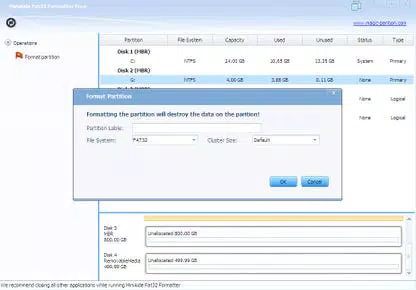
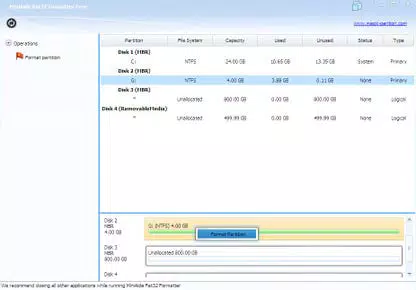
The application offers a suite of core functionalities tailored to modern disk management needs. First, it provides a detailed visual representation of all connected drives and partitions, displaying critical information such as drive type, file system, total and available space, and partition labels. This real-time overview allows users to make informed decisions before initiating any changes. Second, the tool enables flexible partition control, including the ability to create new partitions, adjust sizes dynamically, relabel existing ones, and delete unnecessary sections. These operations are executed with a single click, reducing the risk of errors compared to manual methods. Third, MiniAide Fat32 Formatter supports full drive formatting to the FAT32 file system, a crucial feature for ensuring compatibility with older devices and systems that do not recognize NTFS or exFAT. Fourth, the app includes built-in defragmentation capabilities to improve drive efficiency by consolidating fragmented files and reclaiming unused space. This contributes to better performance over time. Each feature is designed with user safety in mind—changes are reversible in many cases, and the interface prompts users before irreversible actions. For example, formatting a USB drive for use in a DVD player or game console becomes a straightforward process. The tool also supports quick execution of tasks, minimizing downtime during system maintenance.Real-World Use Cases
- Preparing a USB flash drive for use in a car navigation system that only accepts FAT32.
- Reorganizing a hard drive to allocate space between operating system and data partitions.
- Wiping and reformatting an external drive before transferring it to a new user or device.
- Optimizing a fragmented internal drive to improve file access speed and system responsiveness.
- Creating multiple partitions on a single drive for better data organization and backup management.
Interface, UX & Performance
The user interface of MiniAide Fat32 Formatter is clean, minimal, and focused on functionality. It presents all connected drives in a hierarchical list with clear visual indicators for each partition’s status, file system type, and space usage. Navigation is straightforward, with context-sensitive actions accessible through buttons or right-click menus. The layout is optimized for clarity, ensuring that even users with limited technical experience can identify their target drive without confusion. Although the developer did not list formal performance metrics, the application is described as lightweight and efficient, with minimal RAM usage during operation. This suggests stable performance across a range of Windows systems, including those with limited resources. The tool responds promptly to user inputs, and disk operations such as formatting and defragmentation are executed without noticeable lag. The inclusion of a demo video enhances the onboarding experience, helping users understand workflows quickly. The interface remains responsive during long-running tasks, and no crashes or freezes were reported in the available documentation. Stability is maintained through a streamlined codebase and focused feature set. Users can expect consistent behavior across different hardware configurations, though specific compatibility details were not disclosed.Platform Compatibility & Technical Requirements
MiniAide Fat32 Formatter is designed exclusively for the Windows operating system. It is compatible with Windows 10 and later versions, though the developer did not specify minimum OS requirements. The application has a file size of 10.5 MB, indicating a compact and efficient installation. The software version is 1.0.0, released on May 21, 2024. Users can download and install the app without requiring additional runtime frameworks or system updates. The tool does not rely on cloud services or background processes, ensuring local execution and data privacy. Specific hardware requirements were not listed, but the lightweight nature of the app suggests it will run smoothly on most modern Windows devices. The developer did not provide information about support for older Windows versions or enterprise environments. Compatibility with portable drives and external storage devices is implied through the app’s core functionality.Pros and Cons
- Provides a clear, visual overview of all connected drives and partitions.
- Supports FAT32 formatting for cross-platform compatibility.
- Enables safe creation, deletion, and resizing of partitions.
- Includes built-in defragmentation for improved drive performance.
- Lightweight design with minimal system resource usage.
- Intuitive interface suitable for both beginners and advanced users.
- Includes a demo video to guide first-time users.
- Price point of $19.99 may be considered high for a utility tool.
- No support for macOS or Linux platforms.
- Developer did not disclose minimum OS or hardware requirements.
- No automatic backup feature before formatting or partition changes.
- Updates and future development plans were not specified.
FAQ
Is MiniAide Fat32 Formatter safe to use?
The tool operates locally and does not collect user data. However, users should always back up important files before formatting or modifying partitions, as these actions are irreversible.
Can I use this tool to format a USB drive for a gaming console?
Yes, the app supports formatting drives to the FAT32 file system, which is required by many gaming consoles and older devices for USB storage.
Does MiniAide Fat32 Formatter work on Windows 11?
While the developer did not specify compatibility details, the app is designed for Windows 10 and later, which includes Windows 11.
Is there a free version available?
Currently, the app is offered as a paid utility with a one-time purchase of $19.99. No free or trial version was mentioned in the provided information.
How does the defragmentation feature work?
The tool analyzes fragmented files on the selected drive and reorganizes them into contiguous blocks to improve access speed and system performance.


